19 workstations under control from the owner's phone
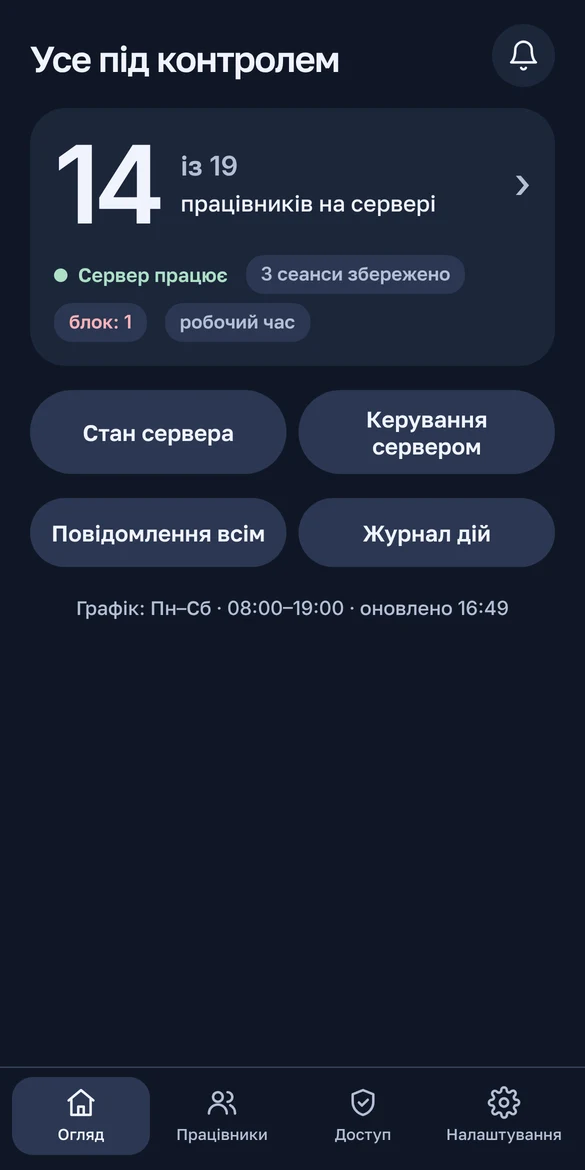
I built a Telegram bot with a Mini App panel that lets the office owner run the 19-seat work server himself. He sees who is working, blocks logins, adds employees, restarts the server and gets alerts — without remote desktop and without calling the admin.

What was broken
The owner already had a simple bot: turn the server on or off and check its state. Everything else went through the admin: who is working right now, how to block a login, a new employee, a restart. The owner wanted to do it himself, from his phone, without remote desktop or a console.
Client requirements
- Everything from a phone, clear to someone without a technical background.
- Several people with different rights. The idea: the owner runs administration himself instead of calling the admin.
- Critical actions (power, blocks, new employees) — only with a PIN.
- A block must not destroy anyone’s work: the session is kept and the person continues where they left off.
- Deleting an employee means disabling them. Data stays, access can be restored.
Constraints
- The old bot keeps working until testing ends and is not touched.
- Don’t touch the office accounting software: the bot may only read its state.
- No monitoring of employees’ screens and no screenshots — a firm requirement.
- All work was remote: no physical access to the office.
- Every change is a ready PowerShell script with a backup, a separate rollback script and a syntax check before delivery.
The solution
The bot lives on the host that runs the office virtual machine and controls it from inside. It only connects out — to Telegram and to the tunnel — so no port is open to the outside.
The bot only connects out — to Telegram and to the tunnel. No port is open to the outside.
- One PowerShell 5.1 process. It’s already in every Windows Server; nothing to install. It listens to Telegram and serves the panel at the same time. Long jobs run in the background so the bot doesn’t freeze.
- Telegram Mini App. A web page that opens inside Telegram like an app. The chat stays for short alerts and “Allow / Deny” buttons.
- Cloudflare Tunnel. The server dials out itself and the panel gets an HTTPS address. The panel itself listens only on the host’s local address.
- Telegram signature check (HMAC-SHA256). Every request from the panel carries a cryptographic seal from Telegram. It can’t be forged without the bot token, so a foreign request won’t pass.
- PIN hashed with PBKDF2. A hash is a “fingerprint” of the PIN that can’t be turned back into the PIN. PBKDF2 is deliberately slow, so brute force makes no sense. After 5 mistakes — a block.
- PowerShell Direct. A channel between the Hyper-V host and its VM that doesn’t go over the network at all. The bot signs in with a service account that is barred from normal logins. Its password is encrypted with DPAPI — Windows’ built-in encryption tied to the machine.
- WTS API. A built-in Windows interface that tells who is connected to the server and for how long. Employee statuses come from it.
- WireGuard. The VPN employees connect through. The bot adds and disables keys on the fly without dropping other connections.
- Data in JSON files plus an action log. A database for a dozen bot users is one more thing to maintain.
- Watchdog. A scheduled task starts the bot with the system and checks it every 5 minutes. A second copy won’t start.
Development story
The bot grew from a stub to version 1.11 over 20 updates. Each touched only the new bot’s files and had its own rollback script.
A stub next to the old bot
What happened: development had to happen on the live server without touching the working bot.
How we fixed it: a separate test bot, its own folder and task. The old bot is read-only. A watchdog and second-copy protection from day one.
Menu, PIN and roles
What happened: access rights and protected actions were needed.
How we fixed it: a chat menu, a hashed PIN, access grants, an action log. A forgotten PIN is reset with a one-time code visible only on the server itself.
A Mini App instead of chat buttons
What happened: a menu of buttons in the chat looked too cheap.
How we fixed it: a Mini App panel following the agreed prototype, with light and dark themes. First a temporary tunnel with a random address, then a permanent one.
Who is working and for how long
What happened: the bot needed to see who is on the server and for how long.
How we fixed it: a service account in the VM with no login right and an encrypted password. A list with names and statuses.
Blocking logins without losing work
What happened: the owner needed to block logins without destroying anyone’s work.
How we fixed it: block one person or everyone: 15 min, 1 hour, a day or until further notice. The session is disconnected but kept. The block lifts itself.
Working hours
What happened: nobody noticed logins at night or on Sunday.
How we fixed it: a schedule in the panel (Mon–Sat 08:00–19:00 by default). A login outside it sends the owner an “Allow / Deny” request. A denial with PIN disconnects and blocks until morning.
The screen didn't fit a phone
What happened: the home screen and the block-duration picker didn’t fit on a phone.
How we fixed it: a more compact interface with no scrolling.
A new employee with one button
What happened: people had to be added without the admin.
How we fixed it: one button creates an account, a VPN key and a signed connection shortcut (the signature removes the Windows warning). A limit of 5 per day. “Delete” = disable login and VPN; the profile stays.
"Couldn't add the employee"
What happened: the very first test failed. PowerShell variable names are case-insensitive, and my $n and $N turned out to be one variable. The new user’s number kept being overwritten.
How we fixed it: renamed the variables and added an automatic check for such clashes before every delivery.
The owner administers himself
What happened: the owner had to run administration himself, power included. The filter row had to be scrolled sideways.
How we fixed it: owner and admin get full rights, power with PIN. A new “manager” role: employees, blocks, schedule. Filters reworked with no horizontal scrolling.
One-time invitations
What happened: the client wanted to add people from his contacts. But a bot can’t message first someone who never started it — a Telegram rule.
How we fixed it: a one-time link with a role, valid for 24 hours. Only its hash is stored. Active invitations can be cancelled.
Maintenance without calling the admin
What happened: some actions still meant calling the admin.
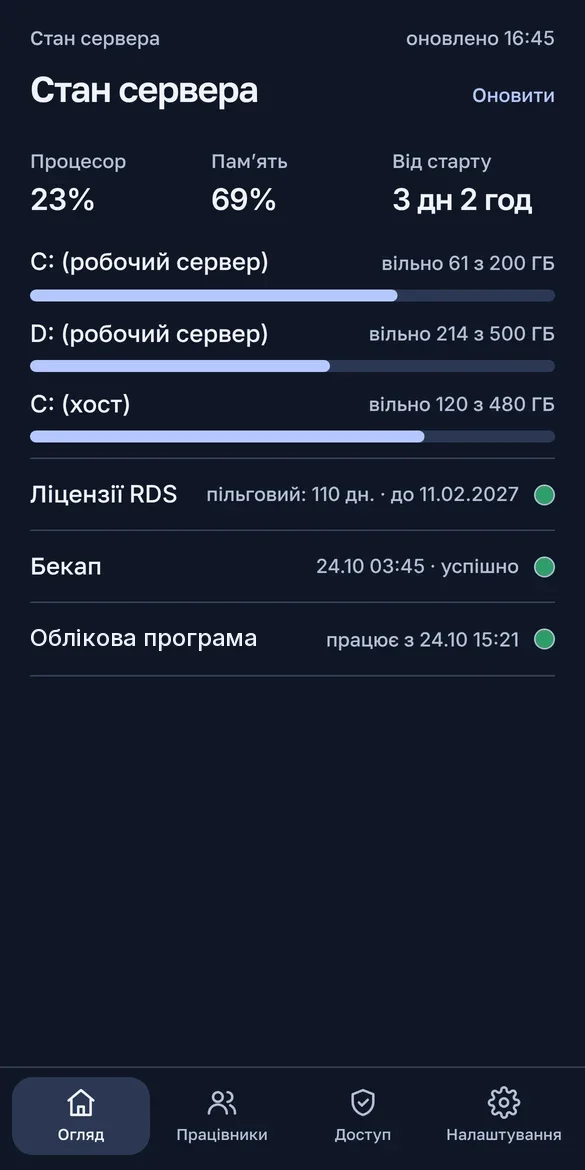
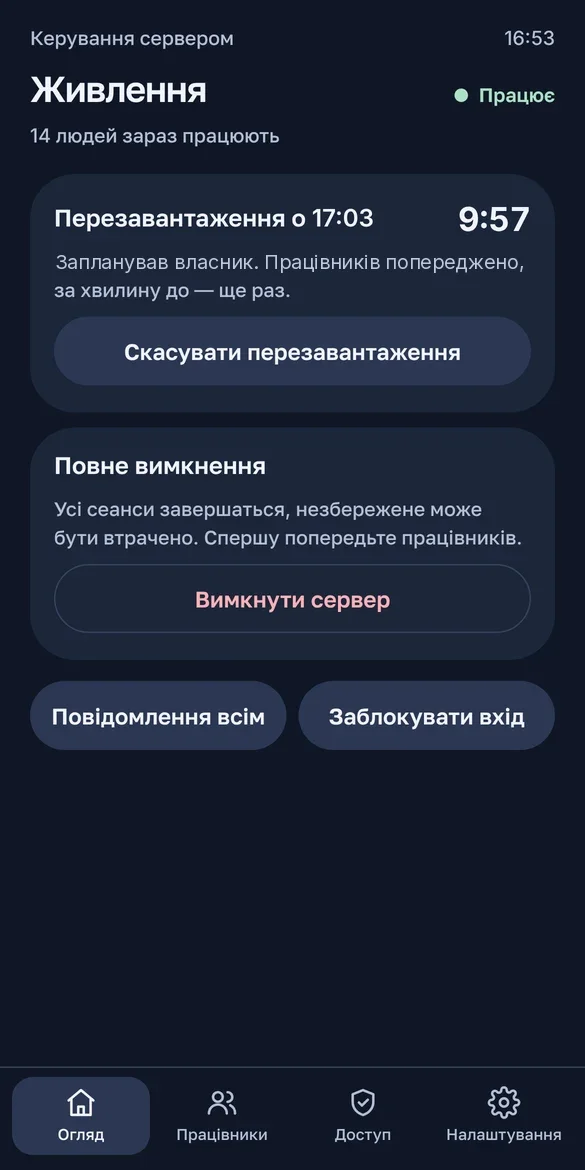
How we fixed it: a new password, a message to everyone’s screen, a restart with a 1/5/10/15-minute warning and cancellation. “Server status”: CPU, memory, disks, backup, warnings.
Staff list: from 12 s to 75 ms
What happened: the staff list stopped fitting into 12 seconds and timed out. The cause: Windows blocks were checked separately for each user.
How we fixed it: one query for everyone — 75 ms. The first status check was moved to a minute after start so it doesn’t get in the way.
A live test on the real server
What happened: everything had to be checked on the real server without affecting people.
How we fixed it: we created a test employee through the bot, checked a new password and a broadcast on it, then deleted and cleaned it up. The restart was tested live too.
A countdown to the restart
What happened: the client wanted a timer until the restart, then “restarting” and “online”.
How we fixed it: a live countdown in the panel. In the chat — one message that updates instead of a stream of new ones. “Status” and “Control” moved to the home screen.
Licences and the accounting software
What happened: nobody tracked the remote-access licence term or whether the accounting software was running.
How we fixed it: a day counter with warnings at 30/14/7/3/1/0 days. The software is read-only: status and an hourly reminder while it’s down.
A status label broke out of its row
What happened: on a narrow screen the status label overflowed its row.
How we fixed it: labels in one column, shorter captions.
Secrets don't go to the chat
What happened: the PIN timer kept running while the PIN was being checked. Passwords and archives went to the chat, where they stay forever.
How we fixed it: the timer pauses during the check. Secrets now sit in the panel’s “Notifications” tab for 15 minutes; the chat gets only a reminder. Tabs got badges. Tested on the live server.
Replacing the old bot with zero downtime
What happened: the new bot had to replace the old one without the office losing control for a single minute.
How we fixed it: a migration package hands over the token, moves the access rights and disables the old bot without deleting it. The rollback turns the old one back on. Handed over to the owner.
Smaller bugs found along the way
- In PowerShell, returning a list from a function with
return , $listbroke filtering further down the pipeline — invitations and the notification counter were miscounted. Now the result goes into a variable first. - Two panel styles had the same name and broke the timer’s look. Renamed.
- Telegram’s forwarding ban would have blocked handing the archive to a new employee. Removed it; protection comes from the 15-minute lifetime.
- To test the interface I built a local bench: the real bot code runs against a mock of Telegram and the server. Panel layout was checked there before each delivery.
Lessons
- Deploy the new next to the old, not instead of it. A separate test bot allowed testing on the live server, and the owner never spent a day without control.
- Small updates with a rollback are cheaper than one big one. The add-employee and staff-list timeout bugs were fixed in the very next update because it was clear exactly what broke.
- PowerShell variable names are case-insensitive. You can’t see that bug by eye, so an automatic check now catches it.
- Ask the system once, not in a loop. The difference was a 12-second timeout versus 75 ms.
- Secrets don’t go to the chat. The chat keeps everything forever; the panel shows a password for 15 minutes and forgets it.
- Platform limits shape the interface. A bot can’t message first, so one-time invitations replaced the contact book.
- One message that updates beats five new ones. The owner sees the restart state in one place and the chat stays clean.
- A local bench is faster than the live server. Layout and scenarios show up in seconds; the live server is for the final check.
Result
Version 1.11 runs on the live server and the bot has been handed over to the owner. Tested live:
- adding, disabling and restoring an employee;
- a new password and a broadcast to screens;
- a restart with a countdown and the server status;
- notifications and downloading a new employee’s archive.
The bot comes with a step-by-step guide for the owner.